Who we are
Inspired by Frigg, the Norse goddess of wisdom and foresight, Frigg-It is the project-management platform that keeps your team aligned with the goal, not lost in side quests
Frigg It provides real insight, tracking statuses and priorities in real time so you can focus on execution
Why you should say Frigg It
Sign Up
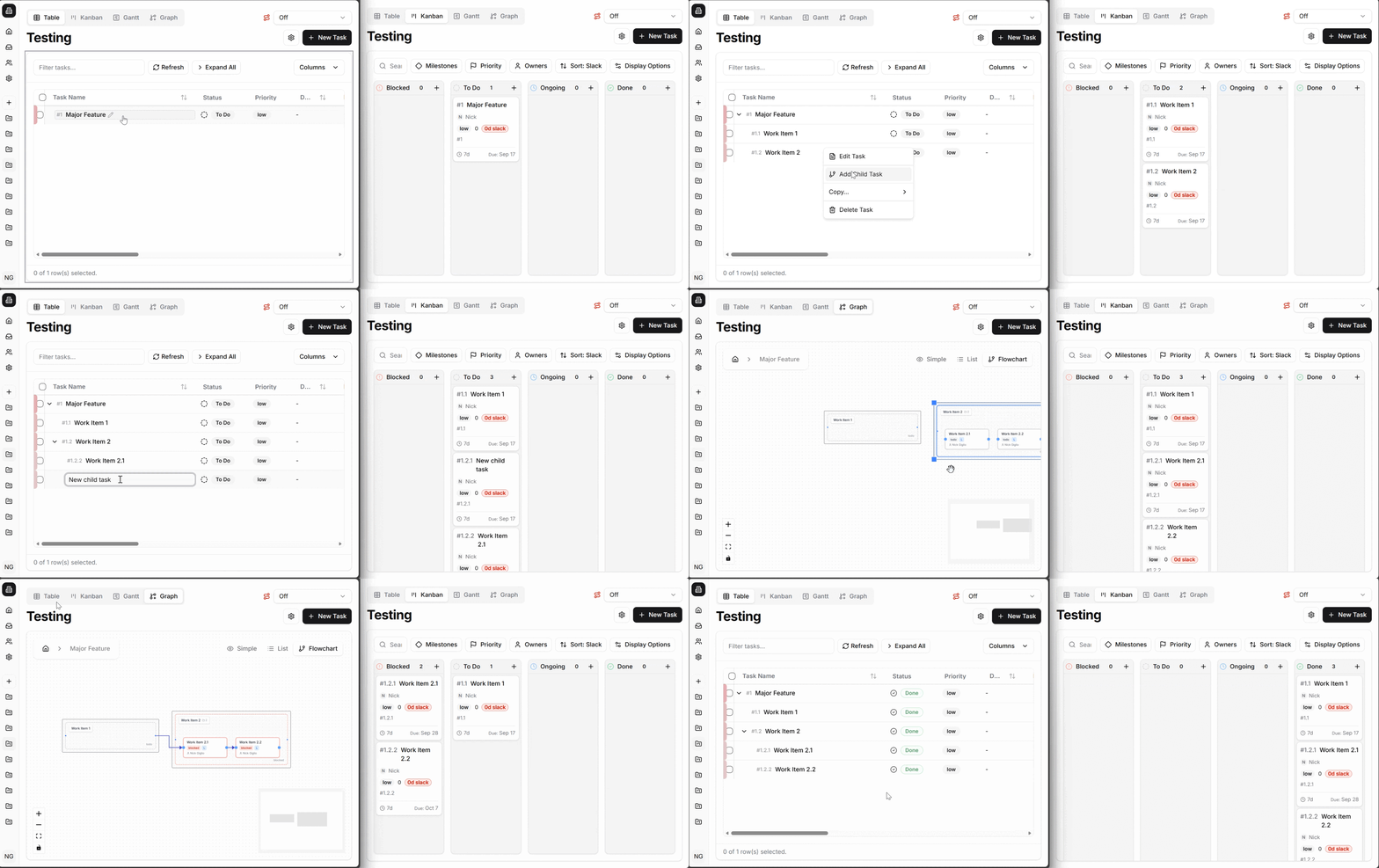
Planning isn’t linear. Your scheduling tool shouldn’t expect it to be
Projects & plans take shape through discussion, discovery, and revision. Frigg It lets you build schedules the same way your planning meetings work, by inserting newly discovered tasks directly into the plan, moving, removing, and reconnecting.
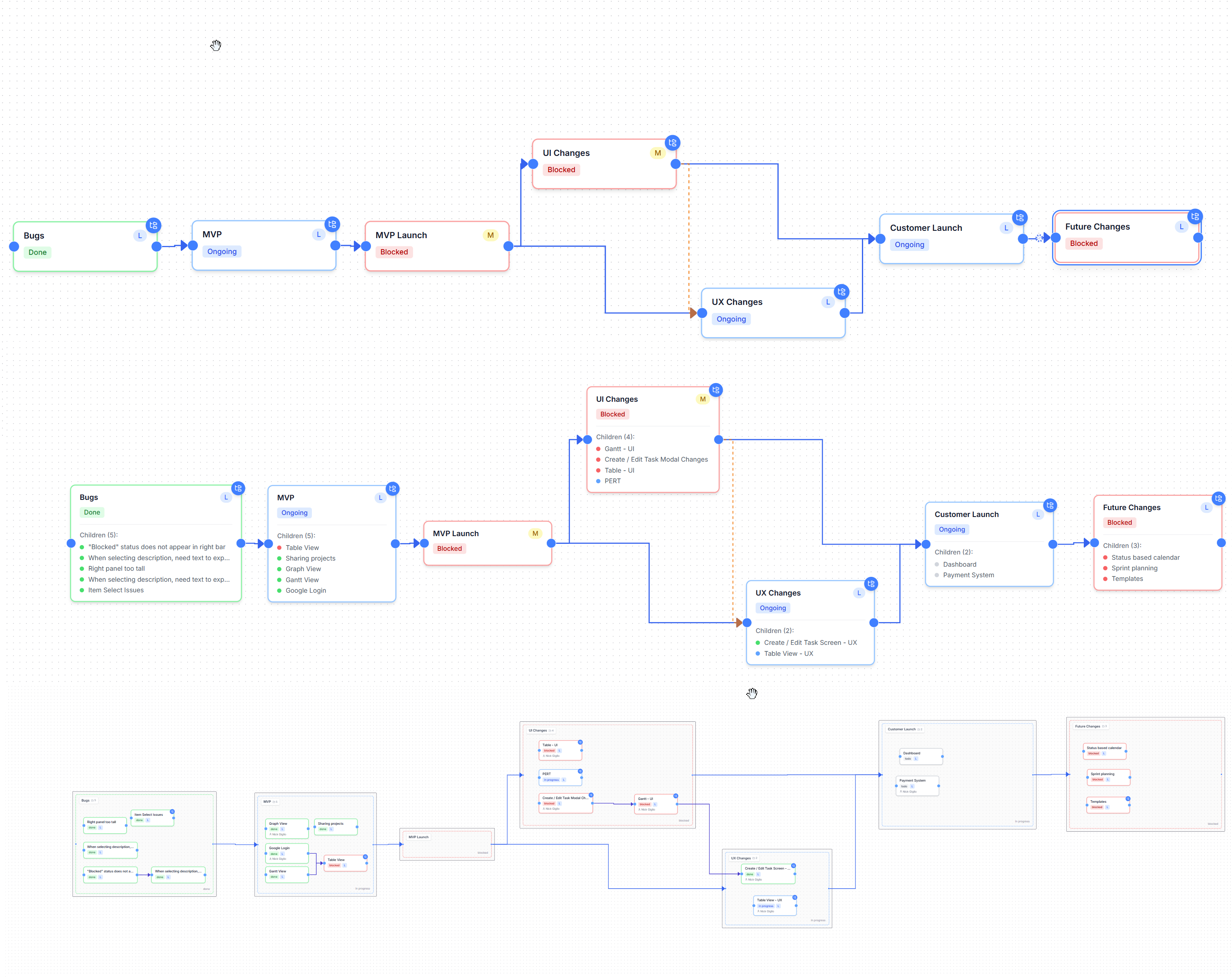
Work in a visually friendly flow chart so everyone can see how the project will work and get buy in at the beginning. No restarting. No artificial order or forced hierarchy. Just a plan that evolves with the project.
A scheduling tool that manages itself
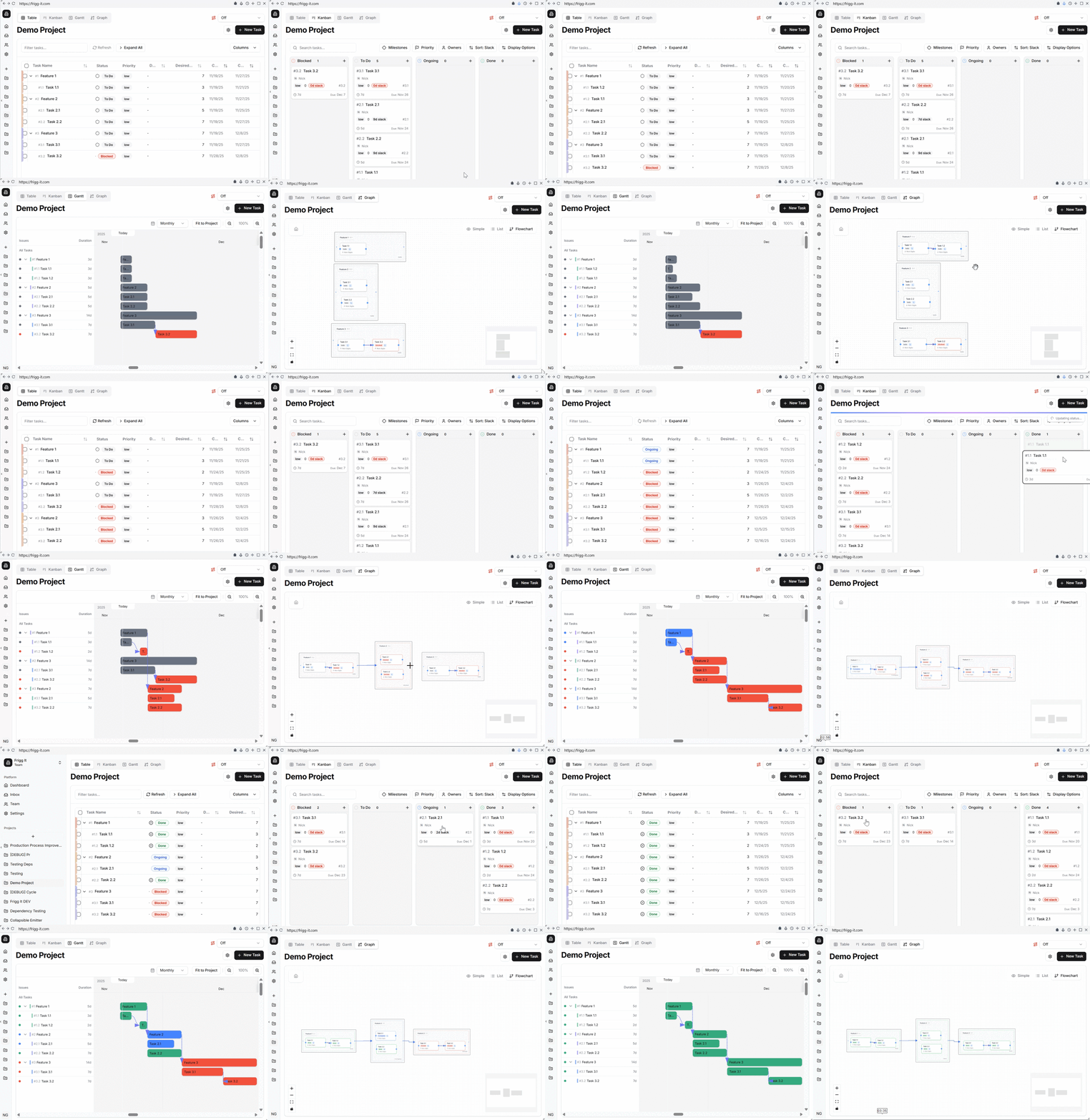
Frigg It automatically tracks dependencies and updates task status in real time, showing what is ready, what is blocked, and why. No manual status updates. No guesswork. Just a schedule that stays accurate as work progresses so you focus on managing the work, not managing the tool.
Prioritize what keeps the project on track
Frigg It prioritizes work based on critical path impact, not static priority fields. Tasks that threaten the finish date surface first, while work with slack is clearly identified as safe to defer. Teams stay focused on preventing slippage and protecting delivery dates.You pick the milestone & Frigg It prioritizes what to work on when to make sure you get there.
Build better
Sign Up
Ship Faster
Analytics Built-in
See clearly. Act wisely. By showing how the parts effect the whole, Frigg It helps you adjust early and keep tomorrow within reach.
Team Focused
Unity through shared vision. Frigg-It provides purpose-built screens that elevate team communication. Plan deeper with flowcharts, monitor progress with Gantt charts, keep ICs focused with daily Kanban, and report clearly with simplified flow views. Every audience sees exactly what they need—nothing more, nothing less.
Build It Your Way
Every journey is different. Build your project tree as deep or as simple as you need to fully track your work. Only the lowest-level tasks appear in the Kanban view, and their status automatically rolls up to their parents for consistent, accurate progress tracking. The tool adapts to your project, so you never have to work around the tool.
Start with Wisdom
01
Critically Minded
Progress that plans itself. As work changes, Frigg It reshapes what’s next — no manual rescheduling required.
02
Analytics Built-in
See clearly. Act wisely. By showing how the parts effect the whole, Frigg It helps you adjust early and keep tomorrow within reach.
03
Secure by Default
Privacy is a stance. Enterprise-grade security built in from the start — your data stays safe while your teams stay agile.
Sign Up
Specs
Build with Us
Frigg It is currently operating with a free-ware Beta license. If you want the change we bring already in your org, we have a paid tier you can explore.
Sign Up
Feature / Tool
Relationship Visualization
Drill-down into Nodes / Work Packages
Automatic Critical Path Calculation
Dynamic Slack / Float Tracking
Priority Based on Criticality (Slack)
Real-Time Adaptive Scheduling
Views: Table / Gantt / Kanban
Cross-Team Collaboration
Critical Path Display Across Project
Automated Status Updates (Based on Dependencies)
AI / Intelligent Prioritization
Best Fit Audience
Frigg It
✅
Network Diagram (interactive node graph with drill-down capability)
✅
Fully visualized dependency network
✅
Yes — node expansion reveals sub-tasks, related data
✅
Yes — continuously updated based on dependencies and duration
✅
Built-in, auto-prioritizes work as slack approaches zero
✅
Yes — automatically shifts visual and task priority
✅
Yes — automatically re-prioritizes when dependencies or durations change
✅
All three integrated with network logic
✅
Designed for multi-disciplinary teams
✅
Visually overlaid on all views
✅
Yes — auto-block/unblock tasks as predecessors complete
✅
Yes — based on live slack and path criticality
✅
Engineers, PMs, Ops — teams managing complex interdependencies
MS Project
✅
Gantt Chart (network logic optional view)
⚙️
Partial (predecessor/successor links on Gantt)
⚙️
Limited (task detail pane)
✅
Yes
⚙️
Yes (manually visible via Gantt columns)
⚙️
Manual (priority + scheduling awareness)
⚙️
Partial (recalculates schedule but not dynamic prioritization)
✅
Table + Gantt
⚙️
Limited (project-focused, less collaborative)
✅
Yes (in Gantt)
⚙️
Partial (with constraints and macros)
❌
No
⚙️
Traditional PMs, construction, enterprise
Monday.com
✅
Timeline / Board
⚙️
Limited (simple dependencies)
⚙️
Yes (task details modal)
❌
No (manual workaround with formulas)
❌
No
❌
Manual
⚙️
Partial (via automations, not critical path)
✅
Table + Board + Timeline
✅
Strong (team dashboards)
❌
No
⚙️
Via automation recipes
⚙️
Limited (rule-based)
⚙
General business / creative teams
ClickUp
✅
List, Gantt, Board
⚙
Moderate (arrows in Gantt)
⚙️
Yes (task details drawer)
⚙️
Partial (manual dependencies)
⚙️
Partial (via calculated fields)
⚙️
Partial (custom automation)
⚙️
Partial (manual or automations)
✅
All three
✅
Strong
⚙️
Partial
✅
Possible via automations
⚙️
Limited
⚙
SaaS/product teams
Linear
✅
Kanban / Roadmap
✅
Minimal (blocking indicators)
⚙️
Yes (issue detail view)
❌
No
❌
No
⚙️
Implicit (based on status, not logic)
❌
No
✅
List + Board
✅
Developer-focused collaboration
❌
No
⚙️
No
⚙️
No
✅
Software dev / tech startups
Jira
✅
Kanban / Timeline
⚙
Moderate (dependency links, not visual)
⚙️ Yes (issue detail panel)
Yes (issue detail panel)
⚙️ Partial (via add-ons or plugins)
Partial (via add-ons or plugins)
⚙️ No native - possible via plug-ins
No native - possible via plug-ins
⚙️ Manual / plug-ins
Manual / plug-ins
⚙️ Possible via advanced workflows
Possible via advanced workflows
✅ List + Board + Timeline
List + Board + Timeline
✅ Strong (developer-focused)
Strong (developer-focused)
⚙️ Plug-in or manual
Plug-in or manual
⚙️ Partial (requires automation rules)
Partial (requires automation rules)
⚙️ Limited via automation
Limited via automation
⚙
Software development, Agile teams
Connect with us
Questions? Curiousities? Rabid fandom? Drop us a line and let’s get in touch.
Email Us

